Durabook R10
A strong contender in the 10-inch rugged tablet class with modern AI capability and proven durability
(by Conrad H. Blickenstorfer; most photography by Carol Cotton)
Durabook is a core brand of Twinhead International Corporation, a company that built its first military-grade laptop three decades ago and has extensive experience with rugged systems, both under its own name and as an OEM supplier. The Durabook brand itself dates back to 2002 and has long been among the leaders in rugged tablets, offering a steady succession of durable, purpose-built tablet computers for a wide range of markets.
Currently, the company's tablet portfolio includes the ultra-rugged Durabook U11 and the somewhat lighter and more compact R11, both with spacious 11.6-inch displays, as well as the more recently introduced R8 with an 8-inch screen. What's been missing, however, is a Durabook entry in the 10-inch rugged tablet market — arguably the most popular segment in rugged Windows tablets by unit volume. Durabook did offer 10-inch models in the past, notably the CA10 and TA10, but those date back more than a decade.
That gap is now filled. The Durabook R10 has arrived, and in this review we take a detailed look at the company's new 10-inch platform — a powerful, thoroughly modern rugged tablet that also brings with it the latest in on-device AI capabilities.

When Durabook introduced the Durabook R10 on October 29, 2025, the tablet was described as providing an "ideal balance of performance, reliability, and mobility, empowering users with a robust and intelligent rugged device that fuses cutting-edge AI capabilities." The company further emphasized that "as a Copilot+ PC, the R10 integrates on-device AI acceleration, enabling Microsoft Copilot+ features to run securely and smoothly — even without cloud access."
In an era of rapidly expanding artificial intelligence applications, as well as AI-assisted and AI-accelerated software, qualifying as a Microsoft-sanctioned Copilot+ PC has quickly become an important distinction. To earn that designation, a device must include at least 16GB of RAM, 256GB of fast storage, Windows 11, and a Neural Processing Unit (NPU) capable of delivering 40+ TOPS. The Durabook R10 meets these requirements, which means it can support a growing range of Microsoft AI features as well as emerging third-party and customer-specific applications.
Importantly, Copilot+ PCs are designed to enable on-device, or "edge AI," processing where supported — allowing certain workloads to run locally in remote deployments without cloud access. At the same time, much of today's generative AI functionality still relies on cloud-based services, making the current Windows AI experience a hybrid of local and cloud processing.
Design — compact, practical and versatile
The Durabook R10 measures 10.43 x 7.46 x 0.83 inches — a noticeably larger footprint than a typical consumer or business 10-inch tablet. That's because, unlike most such tablets, the R10 includes a full complement of standard ports and expansion options rarely found in consumer designs. In addition, the R10 features a substantially more robust build, along with prominent corner bumpers that provide added impact protection.
The larger footprint also allows for — as mentioned above — a generously sized bezel around the display. That space accommodates not only volume up/down controls and two programmable function buttons below the screen, but also a dedicated Copilot button. The R10's starting weight is 2.65 pounds.
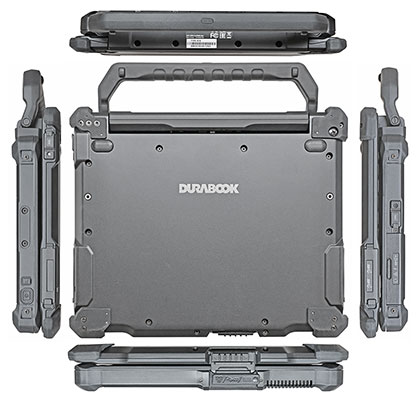
Below you can see the Durabook R10 from the top and all four sides. Borrowing design elements and its overall look from the company's smaller R8 as well as the larger R11 tablets, the new R10 is a professional-looking, well-executed device with a glass front, a very solid black housing, and skillfully integrated protective rubber bumpers.
The bezel area around the display is wide enough to allow a secure grip without inadvertently triggering touch input — something we consider essential in the field, where users may wear gloves and operate the device on the move. Also important, aside from the slightly protruding corner bumpers, there are no raised edges or ridges for fingers to bump into during operation.
An internal magnesium alloy chassis minimizes flex and torsion, contributing to a reassuring sense of rigidity, durability, and overall build quality.

On top of the unit is an expansion area that can accommodate an optional barcode reader, serial port, USB Type-C port, or a second RJ45 LAN jack.
On the left side (see below), beneath a protective cover, are the tablet's standard I/O ports. There is a 3.5mm audio in/out jack, followed by an RJ45 LAN jack, a Thunderbolt 4 port with a reversible USB Type-C connector, and a USB 3.2 Type-A port. These are spaced well enough that all four can be used concurrently. To the right of the I/O cluster is an old-school DC power jack with its own separate protective plug, used with the optional 65-watt AC adapter. Overall, the R10 offers an unusually versatile and well-thought-out port selection for a tablet of this class.

On the right side are the tablet's power/sleep button and one of its three programmable buttons. Also present are anchor points for attaching a leather or fabric stylus holder.
On the bottom is a surface-mounted pogo-pin docking connector for use with office or vehicle docks. There is also a slot for optional RF pass-through connectors for WWAN, GPS, and WLAN.
We are now in an era where peripherals may use either the older USB Type-A connector or the newer, smaller, and reversible USB Type-C format. However, the connector type alone does not define capability. USB-C ports can support a range of underlying standards, including USB 3.x as well as Thunderbolt 4, which uses the same physical connector.
The key distinction is in performance and functionality. Thunderbolt 4 can be seen as a superset of USB-C: it guarantees up to 40 Gbps data transfer, supports power delivery, and enables advanced features such as dual 4K display output. By comparison, USB 3.2 implementations typically offer between 5 and 20 Gbps, depending on the specific generation and configuration.
For charging, users can rely on the optional DC power adapter, a sufficiently powerful USB-C charger (Durabook recommends 65 watts or more), or a Thunderbolt 4 dock that provides at least 65 watts of power. USB-C charging must be done via the Thunderbolt 4 port, identified by the lightning bolt icon.
One issue we encountered is that charging via a Thunderbolt 4 dock can, in some situations, affect system performance and increase thermal load. This is likely due to the additional overhead associated with Thunderbolt's high-speed data and display handling, which involves coordination between system components. While not unique to this device, it is something to keep in mind when using a fully featured Thunderbolt dock in performance-critical scenarios.
Above average wealth of expansion and accessories
Durabook has always been very good with offering various accessories and expansion modules to customize their products for different customers requirements, industries and applications. That can make all the difference when it comes to getting a system just right for an application of deployment. To give an idea of what all is available, let's take a look.
For the Durabook R10, as shown below, the company offers, from left to right, a magnetic stripe reader expansion module, a Smart Card reader expansion module, a UHF-RFID NFC expansion module, and a LF/HF RFID expansion module.

Next, shown below are, from left to right, the optional office dock, a tablet stand, a hand strap. and a rotating hand strap with a kickstand.

Then, again from left to right, a vehicle dock (available wih or without triple RF pass-throughs), a two-bay battery charger, aspare stylus (or digital pen), and a spare high-capacity battery.

One thing that we missed when we reviewed Durabook's smaller R8 tablet was a keyboard that would offer 2-in-1 functionality. Well, the company does offer such a keyboard for the R10, so that the tablet could also be used as a laptop. This option can add A LOT of functionality and fills real needs. Below, the R10 with the optional keyboard on the right, and a look at the backside where the expansion modules bolt on.

The Durabook R10 as a 2-in-1 PC
Perhaps the most valuable accessory for the Durabook R10 rugged tablet is the detachable, backlit keyboard specially designed for it. That way, the R10 can be used not only as a tablet, but also as a laptop, making it a more complete high-performance mobile computing solution. For tasks such as on-site data entry, mapping, inspections, etc., a compact, lightweight tablet works best. But back in a vehicle or office, transforming the R10 into a full-function laptop may boost productivity.
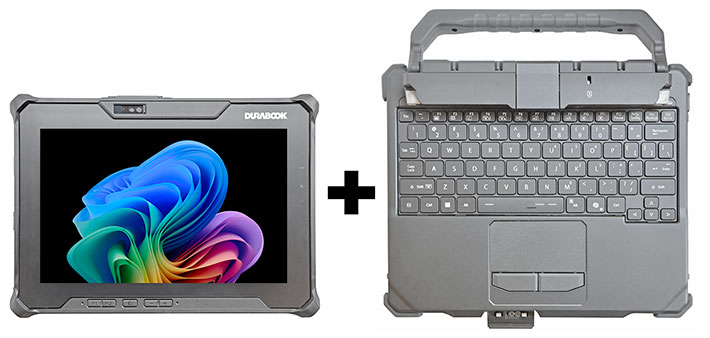
One could, of course, just get one of the many wired or wireless third party standalone keyboards, but having one that's specifically designed for a tablet simply works better. You insert the tablet into the very sturdy hinge-base on the keyboard. The spring-loaded mechanism then holds the tablet firmly in place, and you can even lock it. Instant 2-in-1. A tablet when you need it, and a laptop when you need it. Below is what it looks like:
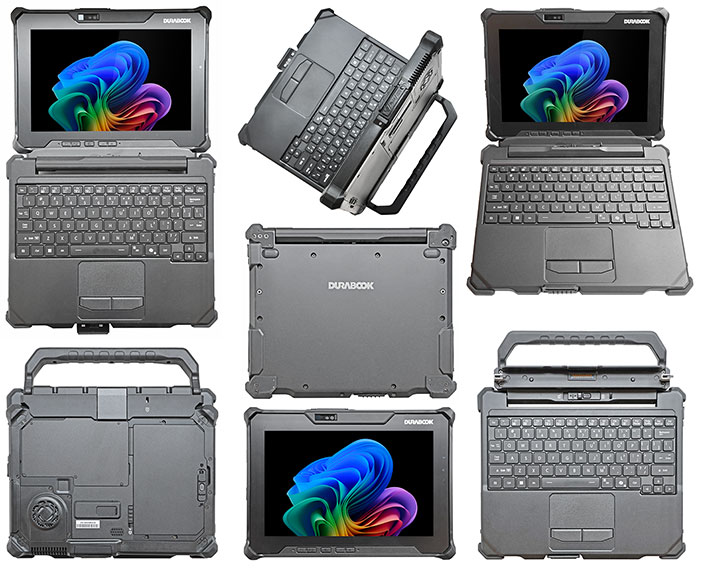
2-in-1 devices aren't new. In fact, they've been available for well over three decades. Back in the early 1990s, the tablet market was booming with devices such as the IBM ThinkPad, the Toshiba Dynapad, the NEC VersaPad, the GRiDPad, the Sharp Expert Pad and many other books, slates and pads. These early pioneers, however, soon realized that handwriting recognition didn't work well enough to replace a physical keyboard.
That brought hybrid devices such as convertible notebooks that worked as laptops, but you could also flip around the display and then you had a (rather thick and heavy) tablet. Unfortunately, many of those early efforts turned out to be too heavy, too expensive, or they just didn't work well. There were also inherent design problems — many hybrids were top-heavy and easily tipped over. The industry saw a number of interesting, and at times weird, solutions, but none really caught on.
Making the hybrid/2-in-1 concept really work required practical solutions. In essence, what's needed was:
- A true 2-in-1 solution. That meant neither a totally new design with some sort of rotatable or flippable keyboard, nor a fully separate external keyboard that would simply plug into a USB port. Instead, the solution would be a keyboard that, while detachable, formed a strong physical connection with the tablet.
- The keyboard had to form a solid and robust foundation when the tablet was going to be used as a laptop. That also meant a strong, reliable hinge mechanism, and a tablet that was light enough to not make the combo top-heavy and prone to tipping over.
- The keyboard itself had to work just as well as a standard rugged laptop keyboard. That meant tactile feedback, optimal key travel, proper scaling, and a standard key layout.
Durabook's implementation of the above described concept is simple as well as brilliant. To address the inherent instability of 2-in-1 solutions where the keyboard is the lighter part and the tablet the heavier one (opposite from the way it is in a standard laptop), Durabook used the integrated tablet handle to make sure the R10 with its keyboard will never tip over.
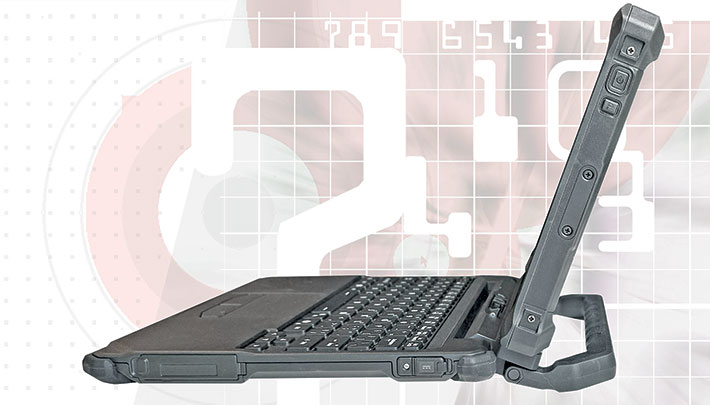
How well does the keyboard itself work? It's an "island" style design, the kind that I think Apple and Sony pioneered a couple of decades ago, and which has been almost universally adopted. The layout is clean and functional, the keys have the common short travel that feels just right. And the R10 being a Copilot+ PC, there's a dedicated Copilot key on the keyboard. One small gripe is that the all-important QWERTY layout is 96% scale and not the full 100% (i.e. exactly 6.75 inches from the center of the letter Q on the left and the letter P on the right). Small thing, but it can throw off touch-typists used to full-size desktop and laptop keyboards.
Also of note is the fact that the keyboard has two additional USB Type-A ports on the front left side, as well as a power jack. Additional I/O ports on the front right side, including USB 3.2 Gen1 (Type-A), HDMI, and LAN (RJ45), are also available as optional configurations to further enhance connectivity. The capacitive multi-touch touchpad measures 3-3/8 x 1-7/8 inches and works well. Below it are the left and right mechanical mousebuttons that provide mechanical as well as an audible click feedback. There is a clasp on the front of the keyboard that secures the tablet and keyboard together when folded closed.
Durabook's 2-in-1 keyboard option weighs 2.16 pounds. Add the tablet's 2.76 pounds, and you have a hefty 4.92 pound combo. If weight is not an issue, this keyboard is a very desirable and highly functional accessory productivity booster for Durabook R10 users.
Innovative, very solid construction
Just like its R8 and R11 siblings, the exterior of the R10 is sleek, giving it the appearance of a beefed-up consumer tablet with protective corner guards. Unlike most consumer tablets, however, the Durabook R10 is purpose-built for demanding professional use.
That becomes evident right away with the battery design. The battery is recessed into the back of the tablet and can be quickly and easily replaced — a key requirement in many business and field deployments, where sealed, non-replaceable batteries (the norm in consumer tablets) are often unacceptable. The battery is fully integrated into the design and does not have a separate compartment cover. Instead, a friction lever with a push-button release securely holds it in place. It is highly unlikely to come loose unintentionally.
Because there is no separate battery compartment cover, the contact area is sealed via a rubber gasket that presses against the magnesium frame to create a watertight seal. When replacing the battery, it is important to ensure that this seal is intact and properly seated. The relatively slender (3/8-inch) Lithium-ion battery is rated at 11.4 volts and 4.4 amp-hours, for a total of 50.16 watt-hours — significantly more capacity than the smaller R8's 27.36 watt-hour standard battery.
Unlike the larger R11, where the entire back panel can be removed to access storage and internal components, the R10 provides a large, sealed access compartment on its rear. Under that cover is an optional 1.92 watt-hour bridge battery that allows hot-swapping of the main battery in the field. Also accessible are the tablet's PCIe NVMe M.2 2242 storage module, a second M.2 slot for optional 4G or 5G mobile broadband, and the Wi-Fi 7 Intel BE201 module. The compartment is sealed with a rubber gasket beneath a screwed-on aluminum cover.

Inside the battery area you'll also find, if so equipped, the nano-SIM and microSD card slots beneath a hinged, sealed cover. Just above the center of the tablet is the R10's 11MP documentation camera, which includes a manually operated privacy cover that can also be left closed for protection. Toward the upper right is the system fan.
Durabook employs either passive or active cooling depending on system configuration and intended use. The smaller R8, for example, is passively cooled, in part because its available processors have relatively low 9/29-watt thermal design power. The more powerful CPUs offered in the R10 are rated at 17/37 watts TDP, making active cooling the more appropriate solution.
We generally disassemble evaluation units further in order to examine the internal frame, motherboard layout, and overall design from both an electronics and ruggedness standpoint. The R10, however, like the smaller R8, proved to be an exceptionally intricate and densely engineered device, and we decided not to take it apart further in order to avoid the risk of damage.
Even without full disassembly, it is clear that Twinhead/Durabook invested considerable effort into getting the design of the R10 right.
Intel "Lunar Lake" Core Ultra Series 2 power
Durabook's R10 tablet, a brand-new design, is powered by Intel "Lunar Lake" Core Ultra Series 2 processors, marketed as the Core Ultra 200V series. Lunar Lake represents Intel's second major AI-focused architectural step in its mobile processor lineup and reflects the company's determination to be a strong player in AI-accelerated mobile computing.
 As computer manufacturers know all too well, selecting the appropriate processor is one of the most critical decisions in mobile system design. The marketing-driven goal is almost always to combine maximum performance, long battery life, minimal weight, and competitive pricing — objectives that are difficult to reconcile fully. Trade-offs are inevitable.
Durabook has a long history of delivering strong computing performance in value-priced platforms, often matching or even exceeding higher-priced competitors. That remains true with the new R10 — the tablet offers impressive performance. However, what defines "performance" has evolved significantly in recent years.
 For decades, processor differentiation was driven primarily by clock speeds, core counts, and thread counts.
As display resolutions increased, graphics performance became more important, leading first to discrete GPUs and later to increasingly capable integrated graphics.
Now, with AI-driven utilities and applications moving into the mainstream, a new class of processing hardware has emerged: the Neural Processing Unit, or NPU.
NPUs are specialized processing engines designed specifically for AI inference workloads — that is, efficiently analyzing data and generating predictions, classifications, or other outputs in real time. Their performance is measured not in clock speed, but in TOPS (tera operations per second), representing trillions of operations per second.
This shift has also reshaped Intel's branding. The 14th-generation Core family, for example, included both refreshed Raptor Lake processors and the newer Meteor Lake designs, which were introduced under the "Core Ultra" name and incorporated integrated NPUs marketed as "Intel AI Boost."
Core Ultra Series 2 processors — including the Lunar Lake chips used in the R10 — take this further, with different variants optimized for distinct usage profiles. There are H-series processors aimed at maximum performance, U-series designs for thin-and-light systems, and the V-series, which places particular emphasis on AI capability and power efficiency. In addition, some variants use standard integrated graphics, while others feature the significantly more capable Intel Arc GPU architecture.
The result is a more differentiated — and at times more complex — processor landscape than in previous generations. Both manufacturers and customers must now consider CPU, GPU, and NPU capabilities when evaluating a platform. In the case of the R10, Durabook selected the mobile V-series Core Ultra 200V designs, positioning the tablet well for AI-accelerated mobile workloads.
The table below lists the eight (!) processor options available for the Durabook R10 and summarizes their key specifications.
|
Intel CPU
|
Core Ultra 7
|
Core Ultra 7
|
Core Ultra 7
|
Core Ultra 7
|
Core Ultra 5
|
Core Ultra 5
|
Core Ultra 5
|
Core Ultra 5
|
|
Model
|
268V
|
266V
|
258V
|
256V
|
238V
|
236V
|
228V
|
226V
|
|
Peak TOPS
|
118
|
118
|
115
|
115
|
97
|
97
|
97
|
97
|
|
P-Cores
|
4
|
4
|
4
|
4
|
4
|
4
|
4
|
4
|
|
Low Power E-Cores
|
4
|
4
|
4
|
4
|
4
|
4
|
4
|
4
|
|
Total Cores
|
8
|
8
|
8
|
8
|
8
|
8
|
8
|
8
|
|
P-cores Max Turbo
|
5.00 GHz
|
5.00 GHz
|
4.80 GHz
|
4.80 GHz
|
4.70 GHz
|
4.70 GHz
|
4.50 GHz
|
4.50 GHz
|
|
Smart Cache
|
12MB
|
12MB
|
12MB
|
12MB
|
8MB
|
8MB
|
8MB
|
8MB
|
|
Thermal Design Power
|
17/37 watts
|
17/37 watts
|
17/37 watts
|
17/37 watts
|
17/37 watts
|
17/37 watts
|
17/37 watts
|
17/37 watts
|
|
Integrated graphics
|
Intel Arc 140V
|
Intel Arc 140V
|
Intel Arc 140V
|
Intel Arc 140V
|
Intel Arc 130V
|
Intel Arc 130V
|
Intel Arc 130V
|
Intel Arc 130TV
|
|
GPU Peak TOPS
|
66
|
66
|
64
|
64
|
53
|
53
|
53
|
53
|
|
Graphics max speed
|
2.00 GHz
|
2.00 GHz
|
1.95 GHz
|
1.95 GHz
|
1.85 GHz
|
1.85 GHz
|
1.85 GHz
|
1.85 GHz
|
|
NPU Peak TOPS
|
48
|
48
|
47
|
47
|
40
|
40
|
40
|
40
|
|
Intel vPro
|
Enterprise
|
Enterprise
|
NA
|
NA
|
Enterprise
|
Enterprise
|
NA
|
NA
|
A key aspect of the NPUs included in all available CPU options is that they meet Microsoft's Copilot+ PC requirement, which calls for at least 40 TOPS of dedicated AI acceleration (with current implementations generally ranging into the mid-to-high 40s). In addition, many edge AI utilities and applications today still rely on the GPU — either alone or in combination with the NPU. Accordingly, each processor option includes Intel Arc graphics, capable of delivering on the order of roughly 50-65 TOPS of AI compute throughput on their own.
Looking at the table above, one notices a somewhat surprising characteristic: the relatively modest core count. All R10 processor options are limited to eight cores, whereas some other Core Ultra Series 2 chips scale to much higher core counts. This is intentional. V-series processors are designed to provide a balanced, AI-optimized architecture rather than maximize performance in heavily multi-threaded workloads. In real-world field use, sustained performance within thermal and power constraints often matters more than peak multi-core throughput.

Despite the wide range of CPU options, the differences among them are relatively subtle. All use an eight-core, eight-thread configuration and include hardware-accelerated Intel Arc graphics. Variations are primarily in clock speeds, cache sizes, and GPU tiering, which will result in measurable but generally not dramatic performance differences. Most notably, the Core Ultra 7 versions include Arc 140V graphics and therefore offer somewhat higher graphics and vector processing throughput than the Core Ultra 5 versions, which use Arc 130V graphics.
To evaluate real-world performance, we tested the Durabook R10 configured with the Core Ultra 7 256V processor using our standard benchmark suite, including the PassMark PerformanceTest versions 6.1 and 9.0, UL's PCMark 10 and 3DMark, Geekbench 5, and CrystalMark for additional validation and single-core performance insight. The table below summarizes the results.
|
10-inch rugged Windows tablets: Where the Durabook R10 fits in
|
|
Company
|
Durabook
|
Dell
|
DT Research
|
Getac
|
Juniper
|
Mobile Demand
|
Zebra
|
|
Model
|
R10
|
Pro 10
|
302RP
|
UX10
|
Mesa Pro
|
T1175
|
ET65
|
|
Introduced
|
2025
|
2025
|
2024
|
2025
|
2024
|
2023
|
2025
|
|
CPU family
|
Core Ultra 7
|
Core Ultra 7
|
Core
|
Core Ultra 7
|
Core
|
Core
|
Core Ultra
|
|
CPU model
|
256V
|
268V
|
i7-1355U
|
266V
|
i7-1165G7
|
i5-1335U
|
155U
|
|
Max RAM
|
16GB
|
32GB
|
32GB
|
32GB
|
16GB
|
16GB
|
32GB
|
|
Storage type
|
PCIe SSD
|
PCIe SSD
|
PCIe SSD
|
PCIe SSD
|
PCIe SSD
|
PCIe SSD
|
PCIe SSD
|
|
Max storage
|
2TB
|
2TB
|
2TB
|
2TB
|
1TB
|
1TB
|
2TB
|
|
Display size
|
10.1-inch
|
10.1-inch
|
10.1-inch
|
10.1-inch
|
10.1-inch
|
10.1-inch
|
10.1-inch
|
|
Resolution
|
1920 x 1200
|
1920 x 1200
|
1920 x 1200
|
1920 x 1200
|
1920 x 1200
|
1920 x 1200
|
1920 x 1200
|
|
Pixels/inch
|
224 ppi
|
224 ppi
|
224 ppi
|
224 ppi
|
224 ppi
|
224 ppi
|
224 ppi
|
|
Luminance
|
1000 nits
|
1000 nits
|
800 nits
|
1000 nits
|
800 nits
|
800 nits
|
1000 nits
|
|
Size (inches)
|
10.43 x 7.46 x 0.83
|
10.33 x 7.40 x 1.00
|
10.71 x 7.70 x 0.79
|
10.98 x 7.65 x 0.92
|
11.2 x 7.70 x 1.20
|
11.54 x 7.56 x 0.67
|
10.80 x 7.80 x 0.70
|
|
Volume (cu-in)
|
64.6
|
76.4
|
65.14
|
77.3
|
103.5
|
58.5
|
59.0
|
|
Weight (lbs.)
|
2.65
|
2.29
|
3.00
|
2.53
|
3.40
|
2.97
|
2.60
|
|
Operating temp
|
-20° to 145° F
|
-20° to 145° F
|
-14° to 140° F
|
-20° to 145° F
|
-4° to 122° F
|
-14° to 122° F
|
-20° to 145° F
|
|
IP rating
|
IP66
|
IP66
|
IP65
|
IP66
|
IP68
|
IP65
|
IP66
|
|
PassMark 6.1 Overall
|
7,931
|
8,955
|
8,534
|
9,227
|
10,257
|
8,241
|
8,139
|
|
PassMark 9.0 Overall
|
6,226
|
7,240
|
5,391
|
6,102
|
5,482
|
5,067
|
4,847
|
|
CrystalMark Overall
|
566,443
|
629,036
|
463,183
|
596,593
|
536,918
|
465,528
|
446,888
|
|
PCMark 10 Overall
|
6,472
|
7,643
|
5,235
|
7,625
|
5,096
|
4,801
|
4,986
|
|
PCMark 10 battery
|
6.32 watts
|
2.63 watts
|
7.57 watts
|
3.88 watts
|
6.25 watts
|
10.64 watts
|
6.63 watts
|
|
3DMark TimeSpy
|
3,517
|
4,545
|
1,231
|
4,069
|
1,604
|
1,237
|
NA
|
|
GeekBench 5 Single
|
1,998
|
2,885
|
1,619
|
2,031
|
1,504
|
1,565
|
2,025
|
|
GeekBench 5 Multi
|
7,145
|
11,377
|
5,528
|
6,202
|
5,562
|
4,810
|
7,474
|
What do the benchmarks above show? Primarily that computing performance is a moving target. What was once considered blistering, top-tier performance quickly becomes baseline. And progress is no longer driven solely by higher clock speeds, more cores, or ever-smaller lithography. Instead, modern computing platforms deliver optimized performance for specific classes of tasks through coordinated use of CPU, GPU, and NPU resources. This can result in substantial gains in some workloads, while others may show only incremental improvement.
Likewise, benchmark tables such as the one above should not be interpreted as definitive rankings. Most products are available with multiple processor options, of which we can typically test only one, and some systems may have been updated or refreshed since their last evaluation in the RuggedPCReview.com lab. In addition, our testing consistently shows that manufacturer tuning, operating system versions, and especially driver updates can result in sometimes unexpected performance variations. The results should therefore be viewed as indicators of the performance class associated with particular processor generations, architectural designs, clock speeds, and thermal envelopes.
As for AI performance, the longer-term balance between GPU-accelerated and NPU-accelerated workloads is still evolving. At present, V-series-based systems such as the R10 offer substantial AI inference capability through the combined strengths of Intel Arc graphics and integrated NPUs, while maintaining competitive performance in traditional CPU-bound tasks.
In practical terms, this means that systems based on older CPU architectures continue to age well and are far from obsolete when it comes to conventional processing. However, for customers exploring or deploying AI-driven applications, these new Core Ultra-based platforms offer a significant increase in capability.
As for the new Durabook R10, it is an excellent performer — equally capable of handling traditional workloads efficiently as it is well-suited for exploring the emerging landscape of AI-assisted and AI-accelerated applications.

Battery life
Battery life is often among the most important considerations when selecting a mobile device. In the early days of laptops and tablets, battery life was one of the weakest aspects of mobile computing. That has changed over time, and since Steve Jobs introduced the original Apple iPad in 2010, users have come to expect eight to ten hours of operation on a single charge. Eight hours generally covers a full work shift, and having additional reserve is always desirable.
 There are, of course, other considerations. With internal, non-user-replaceable batteries, once the charge is depleted the device must be taken out of service and recharged. Externally accessible batteries, by contrast, can be swapped quickly in the field. This is where hot-swapping becomes important. Without it, the system must be shut down and rebooted when changing the battery. Small internal bridge batteries address that limitation by maintaining power during the swap.
Then there is the question of battery capacity. Because size and weight are always critical factors in mobile computing, manufacturers may choose smaller batteries to minimize bulk. Alternatively, they may prioritize extended runtime and reduce the need for battery changes, even at the cost of added size and weight.
In the case of the Durabook R10, the single battery is externally accessible and can be replaced quickly with a freshly charged unit. The standard battery offers a solid 50.2 watt-hours, which Durabook rates at approximately 8.5 hours of operation. An optional high-capacity battery increases capacity to 99.2 watt-hours and is rated at about 17 hours. Our review unit was equipped with the standard 50.2 watt-hour battery.
|
Durabook R10 BatteryMon Power Draws in watts (at idle)
|
|
|
Backlight level
|
Darkest
|
Recommended
|
Brightest
|
|
|
Max Battery
|
4.4 watts (11.4 hrs)
|
5.2 watts (9.7 hrs)
|
7.9 watts (6.4 hrs)
|
|
|
Max Performance
|
5.4 watts (9.3 hrs)
|
6.3 watts (8.0 hrs)
|
9.1 watts (5.5 hrs)
|
We used PassMark's BatteryMon utility to measure power draw. With Windows 11 set to "Best Power Efficiency" mode and display brightness at 0%, we observed a minimum draw of 4.4 watts. At 50% brightness, draw increased to 5.2 watts, and at 100% brightness to 7.9 watts. Dividing the available 50.2 watt-hours of a fully charged battery by the lowest observed draw of 4.4 watts yields a theoretical maximum battery life of 11.4 hours.
Switching Windows 11 to "Best Performance" mode, power draw increased accordingly. At 0% brightness, the system drew 5.4 watts — about one watt more than in power-saving mode. At 50% brightness, draw rose to 6.3 watts, and at 100% brightness to 9.1 watts. Under these conditions, theoretical maximum battery life drops to approximately 5.5 hours.
 It is important to note that BatteryMon measures power draw with the system powered on but largely idle, without actively running user applications.
We also ran the battery life test of UL Solutions' PCMark 10. We use the "Modern Office" test, which simulates continuous real-world usage by running a variety of applications without idle periods. We consider this a high-load scenario that reflects sustained, active use. In accordance with UL guidelines, display luminance was set to 200 nits. In this test, the Durabook R10 achieved 7 hours and 56 minutes.
This result comes close to Durabook's claim of approximately 8.5 hours of battery life per charge. In real-world use, however, runtime will vary depending on screen brightness, workload, and usage patterns. For example, operating the R10 continuously in "Best Performance" mode with the display at its maximum brightness of 1,000 nits will reduce runtime significantly, even with the tablet's reasonably sized standard battery. This helps explain the availability of the optional high-capacity battery.
How does the Durabook R10 with its 50.2 watt-hour battery compare to the smaller Durabook R8 with its 27.2 watt-hour pack? In our testing, the R8 achieved 6 hours and 41 minutes in the same PCMark 10 battery test, compared to the R10's 7 hours and 56 minutes. In automotive terms, while the R10 may not be quite as efficient, it offers greater range thanks to its larger "fuel tank."
Onboard cameras
The Durabook R10 features both front and rear cameras, as expected from a modern tablet, and both are equipped with a physical shutter design for enhanced privacy and security. On the front is a 5-megapixel IR webcam for Windows Hello. The rear camera is for picture taking and documentation. It has an 11-megapixel imager, and the pictures we took came out in 4:3 aspect ratio 3,840 x 2,880 pixel resolution — 11-megapixel. We used the cameras on our review unit via the standard Windows 11 Camera application, version 2022.2510.2.0. Image settings allowed selecting resolutions ranging from 160 x 120 pixel up to 2592 x 1944 pixel on the user-facing camera, and 320 x 240 pixel up to the full 3,840 x 2,880 for the documentation camera. Both cameras can be used for stills as well as for video.
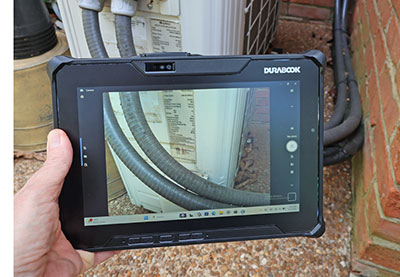 As we've repeatedly mentioned over the years, our experience with cameras integrated into rugged vertical market handhelds and tablets has generally been underwhelming, with most lagging well behind what's available in smartphones dedicated and point & shoot cameras. The situation is getting better, probably in part due to pressure from customers who by now are used to consumer smartphones and tablets equipped with very good cameras.
The rear-facing documentation camera of the R10 is good enough for certain jobs. After a bit of practice, the test pictures we took with the device were suitable for certain field documentation tasks. We're not talking contemporary iPhone or Android smartphone quality, but good enough.
The Windows Camera app user interface remains limited, but at least there is manual focus and manual exposure compensation, both via onscreen sliders. In picture taking mode, you can select from panorama, video, photo, document, whiteboard and barcode scanning modes.
The pictures below were shot with the Durabook R10 in its highest resolution mode. Click on the image to bring up a full-size version.

The R10 documentation camera is capable of taking decent pictures. There is good sharpness and image detail, but a bit too much compression that can render pictures from such integrated cameras less than perfect due to artifacting. Patience is needed at times, as the camera takes a bit of time focus.
In video mode, there are no fewer than 16 resolution and aspect ratio settings, though most users will probably stay with 1080p. The documentation camera generally doesn't fall behind and the maximum 2160p can be quite useful, even at 30 frames per second. Today's smartphones have spoiled consumers with their generally excellent cameras and imaging apps. It'd be good to see some of that tech in professional tools like rugged tablets.
Note that camera applications that come with mobile operating systems are often replaced with third party software optimized for certain imaging tasks, or developers and systems integrators include camera and video functionality directly into custom software.
Excellent display
As mentioned, the 10-inch diagonal size is the "sweet spot" for rugged Windows tablets, and the segment with by far the largest market share. One can, of course, run Windows on a smaller screen — Durabook's 8-inch R8 tablet demonstrates that well — but unless a device truly needs to be as compact as possible, the roughly 56% larger display area of a 10-inch tablet compared to an 8-inch one is a significant advantage.
As for resolution, 1920 x 1200 pixel WUXGA has become the de facto standard for 10-inch rugged tablets, and that is what the R10 offers. At 218 pixels per inch, the display is sharp enough that individual pixels are effectively indistinguishable at normal viewing distances — what Apple would describe as "retina" quality. This is noticeably sharper than the smaller Durabook R8's 189 ppi, though still below the very high pixel densities common in modern smartphones. As always, it's a matter of use case: for running Windows on a 10-inch tablet, this resolution feels well balanced.
The display supports capacitive multi-touch, with an optional active digitizer available. There are also multiple touch modes optimized for use with gloves, in wet conditions, or with a stylus.

The R10 comes standard with Durabook's "DynaVue" sunlight-readable display technology, which uses optical bonding to reduce internal reflections. Brightness is another strong point. Standard laptops rarely exceed 300 nits, and most consumer tablets top out around 500 nits. The R10 is rated at 1,000 nits, and in our testing it actually reached about 1,050 nits — an excellent result that makes outdoor use far more practical than with typical consumer devices.
 Compared to displays from earlier generations of mobile computing, modern screens are dramatically improved. Indoors, most are close to ideal. Outdoors, however, remains challenging due to constantly changing ambient light, direct sunlight, and reflections. For the past couple of decades, most laptops, tablets, and smartphones have used glossy displays because they offer vibrant colors and strong visual "pop."
Outdoors, however, glossy screens are highly reflective. There is no perfect solution, but there are trade-offs. Matte or semi-matte displays reduce reflections by diffusing light rather than reflecting it directly. The R10 uses what we would characterize as a semi-matte display, similar to the smaller R8. The larger Durabook R11, by contrast, uses a glossy panel. Both approaches have their merits, and the choice often comes down to user preference and application.
The images below show the R10 display outdoors on a clear Tennessee afternoon. Viewed head-on, the screen remains bright and vibrant, without noticeable washout. Tilting the display does not introduce the mirror-like reflections typical of glossy panels, though image contrast gradually diminishes as the viewing angle increases.

A common limitation of older display technologies was strong dependence on viewing angle, often resulting in significant color and contrast shifts. The Durabook R10 does not exhibit such issues and maintains consistent image quality across a wide range of viewing angles.
Overall, the Durabook R10 display is excellent, which is in line with expectations for a device in this class. The 10-inch size is sufficient for running Windows without major compromises. Depending on user preference, it may still be useful to adjust scaling settings so that interface elements such as icons, menus, and checkboxes are appropriately sized. As always, touch-optimized applications further enhance usability on displays of this size.
Impressive ruggedness
 The idea behind the Durabook R10 was to create a fully rugged Copilot+ PC tablet for professionals who require powerful, reliable technology in mission-critical environments — a device capable of withstanding the drops, mishaps, and general abuse that inevitably occur in the field.
To substantiate those claims, the Durabook R10 is certified to meet MIL-STD-810H testing for drop, shock, vibration, rain, dust, altitude, freeze/thaw, high and low temperature, temperature shock, and humidity. The tablet is also MIL-STD-461G certified for electromagnetic interference, meeting both emission and susceptibility standards. In addition, the R10 complies with ANSI/UL 121201 Class I Division 2 requirements for intrinsic safety, meaning it can be used in environments where flammable gases may be present.
By far the most common cause of failure in tablets is accidental drops during operation. For that reason, most rugged tablets are designed to withstand 4-foot drops — roughly the height from which a device might fall out of a user's hands. The R10 goes further. Thanks to its solid construction and substantial corner bumpers, it is rated for six-foot drops, providing an additional margin of protection in real-world use.

Durabook also specifies vibration resistance testing consistent with MIL-STD-810H methodologies — typically involving operation under controlled vibration across multiple axes for extended periods.
For sealing against dust and liquids, the Durabook R10 carries an IP66 ingress protection rating. The first "6" indicates complete protection against dust, while the second "6" signifies resistance to powerful water jets from any direction. In practical terms, the R10 can handle heavy rain and can even be rinsed off if necessary. As always, maintaining proper sealing requires that all port covers are securely closed and that battery seals are in good condition.

The operating temperature range of the R10 spans from -20 to 145 degrees Fahrenheit (-29 to 63 degrees Celsius), which is sufficient for most demanding environments, including cold storage applications.
 It is also worth noting that Twinhead has decades of experience in rugged computing. The company manufactured the well-known General Dynamics Itronix rugged notebooks in earlier years and continues to serve as a major OEM supplier for system integrators worldwide. That depth of experience is reflected in the R10's design.
Compared to commercial or semi-rugged devices, the R10 was engineered from the ground up to withstand significantly greater levels of stress. A strong internal magnesium chassis minimizes flex and helps protect critical components such as the display, while the integrated corner bumpers provide additional impact absorption.
It should be noted that some elements of the tablet, such as antenna areas, are located outside the primary sealed sections. As a result, moisture can enter those areas under certain conditions. After exposure to heavy rain or liquids, it is advisable to inspect and dry those sections as needed.
Summary: The Durabook R10
With the Durabook R10, rugged systems pioneer Twinhead brings decades of experience to the popular 10-inch form factor. Filling the gap between the company's smaller R8 and larger R11 platforms, the new R10 delivers a thoroughly modern rugged tablet design with strong computing performance for demanding field operations, along with readiness for emerging on-device AI workloads.

Built on a choice of eight Intel Core Ultra 200V Series processors, with up to 32GB of RAM and up to 2TB of fast PCIe NVMe storage, and meeting Microsoft's Copilot+ PC requirements, the Durabook R10 offers ample performance for both traditional Windows applications and increasingly important AI-assisted and AI-accelerated workloads.
The R10 is also highly configurable, with a wide range of integrated and optional expansion modules that add ports, data capture capabilities, and connectivity options tailored to specific vertical applications.
A 10-inch display remains the sweet spot for Windows-based field computing — large enough for efficient operation, yet compact enough for mobility. The R10's bright 1,000+ nits display, combined with its semi-matte surface, works well both indoors and outdoors. Touch performance is excellent, with dedicated modes for glove use, wet conditions, and stylus input, and an active digitizer is available
Mechanically, the R10 is a true fully rugged device. Its magnesium alloy chassis, robust construction, integrated corner protection, wide operating temperature range, and strong ingress protection rating enable it to withstand conditions far beyond what consumer-grade tablets are designed to handle.
In terms of performance, the R10 delivers solid results across both conventional and emerging workloads. While its V-series processor platform emphasizes balanced, efficient operation rather than maximum multi-core throughput, it provides strong real-world performance and substantial on-device AI capability through its combination of CPU, GPU, and NPU resources.
Overall, the Durabook R10 is a well-executed addition to the company's lineup and a competitive entry in the 10-inch fully rugged tablet segment. For organizations seeking a modern, AI-capable fully rugged 10-inch Windows tablet, the Durabook R10 represents a well-balanced and thoughtfully engineered solution.
– -- Conrad H. Blickenstorfer, April 2026
|
Durabook R10 Specifications
|
| Status |
Review 04/2026
|
| Product type |
Compact rugged 10-inch Copilot+ Windows tablet computer
|
| Processor
|
Intel Core Ultra 7 268V (5.0 GHz max turbo, 118 overall peak TOPS)
Intel Core Ultra 7 266V (5.0 GHz max turbo, 118 overall peak TOPS)
Intel Core Ultra 7 258V (4.8 GHz max turbo, 115 overall peak TOPS)
Intel Core Ultra 7 256V (4.8 GHz max turbo, 115 overall peak TOPS)
Intel Core Ultra 5 238V (4.7 GHz max turbo, 97 overall peak TOPS)
Intel Core Ultra 5 236V (4.7 GHz max turbo, 97 overall peak TOPS)
Intel Core Ultra 5 228V (4.5 GHz max turbo, 97 overall peak TOPS)
Intel Core Ultra 5 226V (4.5 GHz max turbo, 97 overall peak TOPS)
|
| Thermal Design Power |
17/37 watts (all available processors)
|
| OS |
Windows 11 Pro |
| Graphics |
Ultra 7 processors: Intel Arc 140V
Ultra 5 processors: Intel Arc 130V
|
| Memory |
16GB or 32GB LPDDR5x
|
| Display type |
TFT LCD, 1000 nits (1050 nits measured) DynaVue sunlight readable display with capacitive multi-touch screen
|
| Display size and resolution |
10.1" WUXGA, 1920 x 1200 pixel resolution (218 ppi)
|
| Digitizer/Pens |
Capacitive multi-touch
|
| Buttons |
power, volume up/down, four programmable user-definable soft keys |
| Keyboard |
Onscreen keyboard + optional external |
| Storage |
256GB / 512GB / 1TB / 2TB PCIe NVMe SSD; optional OPAL 2.0 SSD
|
| Expansion slot |
Optional magnetic stripe reader
Optional smart card reader OR
Optional smart card reader with LF/HF-RFID (NFC) OR
Optional LF/HF-RFID (NFC) reader OR
Optional UHF-RFID (NFC) reader
|
| Slots |
1 x MicroSDXC, 1 x Dual SIM (Nano SIM + eSIM)
|
| Housing |
Est: Plastic with rubber bumpers over magnesium alloy chassis |
| Temperature |
-29° to 63°C (-20° to 145°F) |
| Humidity |
5% to 95% non-condensing |
| Vibration |
MIL-STD-810H |
| Enclosure Class |
IP66 |
| EMI |
MIL-STD 461G certified |
| Shock: Transit Drop |
MIL-STD-810H: 26 x 6 foot drop |
| Certifications |
Est: US: FCC, DOC+, CUS, FCC ID; EU: CE, CB; CAN: CUS, IC |
| Size (inches) |
10.43 x 7.46 x 0.83 inches |
| Weight |
Starting at 2.65 lbs. (test unit weighed 2.65 lbs)
|
| Power |
65 watt AC adapter,
11.4V 4,400mAH 50.2 watt-hour Li-Ion battery ("8.5 hrs"); optional high-capacity 11.4V, 8,700mAh, 99.2 watt-hour Li-Ion battery ("17 hrs), optional bridge battery
|
| Camera |
5.0 MP IR camera for Windows Hello, optional 11mp rear-facing auto-focus with LED flash and geo-tagging, both come with dynamic shutter design and support full 1080p video @ 30 fps
|
| Data collection |
Optional 1D/2D barcode reader, optional Smart Card reader OR RFID |
| Wireless |
Intel Wi-Fi 7 BE 802.11 be WiFi with Bluetooth v5.4; optional: GPS, 5G and 4G LTE multi-carrier WWAN, RF antenna pass-through
|
| Interface |
1 x Thunderbolt 4 (type C)
1 x USB 3.2 Gen 2 (type A)
1 x RJ45 LAN
DC power jack
1 x Audio in/out (combo jack)
docking connector (20-pin Pogo)
Optional:
1 x USB 3.2 Gen 1 (type C)
1 x USB 3.2 Gen 1 (type A)
1 x DB9 serial port (RS232, 422 and 485
2nd RJ45 LAN
1D/2D barcode reader
smart card reader
RF antenna pass-through for GPS, WWAN and WLAN
|
Price |
Inquire
|
| Web page |
Durabook R10 web page |
| Spec sheet
|
 Durabook R10 (pdf) Durabook R10 (pdf)
|
| Warranty
|
3-year limited warranty
|
(copyright 2023 RuggedPCReview.com)